Monday, 11 June 2012

Remove Blogger default Navbar

Easy Steps to remove Blogger default navbar
Remove Blogger default NavbarI like this blogger site but one thing i hate is bloggr default navbar which is in the top of the blog because i want to personalise my blog as its my own. after long time i found this method how to remove blogger default navbar from the blog.

Follow this simple steps to remove blogger default navbar.

1. Sign in to your blogger account by typing www.blogger.com in internet explorer
2. Login to your account blogger account.
3. In layout section edit the html of your blog and find
]]></b:skin>


add this code
#navbar-iframe{height:0px;display:none;visibility:hidden; }


after that your code should be like this
]]>#navbar-iframe{ height:0px; display:none; visibility:hidden; }</b:skin>

Geniune Windows 7 64+32 bit ALL Addition + Activation


Windows 7 is the most recent version of Microsoft Windows, a series of operating systems produced by Microsoft Coporation for use on personal computers, including home and business desktops, laptops, netbooks, tablet PCs, and media center PCs Windows 7 was released to manufacturing on July 22, 2009, and reached general retail availability worldwide on October 22, 2009, less than three years after the release of its predecessor, Windows Vista. Windows 7's server edition, Windows Server 2008 R2, was also released at the same time.
Different from Windows Vista, which introduced a large number of new features, Windows 7 was extended to be a more focused, incremental upgrade to the Windows series, with the goal of being compatible along software and hardware with which Windows Vista was already compatible. According to Microsoft in 2008, Microsoft would intend on multi-touch support, a redesigned Windows shell with a new taskbar, a.k.a. the Superbar, a home networking system called HomeGroup, and several performance improvements. Some standard applications that have been included with prior releases of Microsoft Windows, including Windows Calendar, Windows Mail, Windows Movie Maker, and Windows Photo Gallery, are not included in Windows 7; most are instead offered separately at no charge as part of the Windows Live Essentials suite. 

Saturday, 9 June 2012

How to Unlike a Page on Facebook

How to Unlike a Page on Facebook Timeline
It’s very easy to like Facebook fan Page and become a fan of people, bands, and artists by clicking the like button at the tops of their page. After you liked the fan page you may have faced that you wall is polluted with unwanted stuff which you never want and missed the useful stuffs which you really want. You may have missed the things that your nearest person shared. Suppose you have Liked the news Fan Page to know the news and keep updated but what when they shares unwanted news like news bombing. If you are really tired and upset with this and want get rid of this then here are the tips to Unlike a page on Facebook.

how to unlike a Page on Facebook(Single Page)

These steps will allow you to find the Unlike button and Unlike a Page on Facebook Timeline.

Cowon Jet Audio Plus v8.0.17 Full Version Mediafire Link


 JetAudio is integrated multimedia software composed of a single compact rack. Not only does it play various music and video files, but it also has other features such as Cd burning recording conversion to other file formats, and so on. In addition to these features, you have the ability to create your ownInternet broadcasting by using JetCast, which is provided with JetAudio. Play all major file formats and discs, including WAV, MP3, MP3Pro,OGG, WMA, MPG, AVI, WMV, MIDI, RM, and video, and audio CD. Convert among audio file formats, and record analog audio to various formats. 

AVG Internet Security 2012 Full Version Mediafire Link


Get complete protection from the most dangerous threats on the internet – worms, Viruses, trojans, spyware, and adware.Antivirus and antispyware protection for Windows from the world’s most trusted security company. Use the Internet with confidence in your home or small office.AVG Antivirus is one of the most complete programs we have found to date. It includes many new options to make it one of the most effective virus scanners on the market


Thursday, 7 June 2012

How to Reduce Image File Size without Losing Quality


punyPNG
The file size of the image with good quality is usually very large. This means using a lot of space on hard drive. The solution this problem you can reduce the file size of the image but without reducing the quality of the image. To Reduce Image File Size without Losing Quality there are many tools and software can be used.  On this article I only wrote three tools namely 2 online tools and other tools using software. The reason why I chose this tool/software because this tool is very easy to use and free.
The following review of the tools and how to use it:
1.  Reduce Image File Size without any Loss of quality using PunyPNG
PunyPNG is a free online tool that dramatically reduces the file size of your images without any loss of quality. PunyPNG support PNG, JPEG and GIF image format.
PunyPNG is very easy to use, you just open PunyPNG website and upload your image by clicking “Upload Images” button and this tool will reduce the file size of your image automatically.

How to Improve Windows 7 Performance without Loosing Aero GUI quality


Windows 7 having eye candy desktop with Aero Glass GUI (graphic user interface) but its main cause that decreases performance of your computer. But most windows 7 user loves this windows 7 GUI interface although they should lose their computer performance.
If you loaded windows 7 in your computer and want to improve the performance of your windows 7 but without losing desktop quality you can use following tips and tricks. Before using this tips, make sure to use aero theme on your computer.
A. Fine Tune Visual Effects
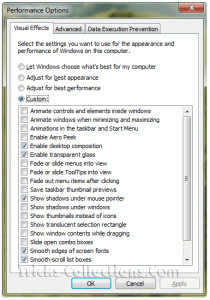
Windows 7 visual effects settingSometimes we don’t need some visual effect on windows 7 because its waste computer resources. To tune visual effect in windows 7 follow this steps:
  1. Click Windows Start Button and type “adjust the appearance” in search program and file then hit Enter. This will load the Visual Effects performance options.
  2. On this screen I suggest to disable following settings by removing the check:
    - Animate controls and elements inside windows
    - Animate windows when minimizing and maximizing
    - Animations in the taskbar and start menu
    - Enable aero peek
    - Fade or slide menus into view
    - Fade or slide ToolTips into view
    - Fade out menu items after clicking
    - Show shadows under windows
    - show translucent selection rectangle
    - Show window contents while dragging
    - Slide open combo boxes
  3. Click Apply then OK when you are finished.